Chromecast 2nd Gen & Audio Not Working? Try This Fix
Over the weekend, reports emerged of Google’s Chromecast 2nd Gen and Chromecast Audio failing to function properly. Specifically, users experienced issues when trying to cast content to these devices or access them through the Google Home app.
Updated on March 12: While a temporary workaround has been discovered, Google has now provided official guidance for affected users.
Chromecast Not Casting? Here’s Why
According to multiple posts in the Chromecast and Google home threads on Reddit, first spotted by 9to5Google, the problem primarily affects the Chromecast 2nd Gen and Chromecast Audio. However, some users have also reported similar issues with the newer Chromecast 3rd Gen.
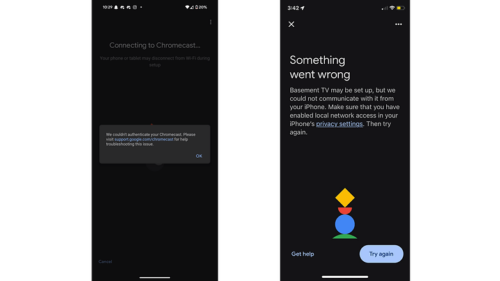
The main concern appears to be that these Chromecast devices are unable to play video or audio from a smartphone or tablet. Some users have shared screenshots with varying error messages, such as “Untrusted device: [device name] couldn’t be verified. This could be caused by outdated device firmware.”
This issue is not limited to the U.S. but appears to be impacting users worldwide. Additionally, the root cause is suspected to be on Google’s server side, with one user pointing to an expired intermediate authentication certificate, which was valid until March 9, 2025, at 16:44:39 GMT, based on the shared strings of code. Reports indicate that the problem began immediately after this expiration.
Some users speculated that this issue could be related to Google’s discontinuation of support for these older Chromecast models. However, this theory has been contradicted by the fact that Google has not officially announced any deprecation of the affected devices.
A Possible Quick Fix for Chromecast Connectivity Issues
While some users initially attempted to reset their devices, this approach did not resolve the issue. In some cases, it even caused the Chromecast to completely lose connectivity, making it inaccessible.
Fortunately, a few workarounds have been shared on Reddit. The simplest non-technical solution involves:
- Resetting the Chromecast device.
- Re-adding it to the Google Home app.
- Setting the date on the smartphone or tablet used for setup to a time before March 9, 2025.
However, this method has had mixed results, working for some users but failing for others. Additionally, those who successfully reset their device and changed the date have been unable to modify the settings, leaving their device stuck with the default configuration.
Although this workaround has helped some users, it is now recommended to follow Google’s advice, posted below, as they work on the definitive fix.
Google’s Response to Chromecast Not Working
On Monday, Google acknowledged the issue affecting select Chromecast devices, preventing them from casting. In a follow-up update on Tuesday, the company confirmed it had identified the cause and was actively working on a fix.
Please do not factory reset your device. If you previously performed a factory reset during troubleshooting, you may also be experiencing an issue where you’re unable to re-setup your device. The team has identified the cause for this as well and is currently working on a fix.
We’re working to resolve this as soon as possible, and will keep you updated when there is more to share.
We sincerely apologize for the inconvenience, and appreciate your patience in the meantime.
Additionally, Google advised users not to reset their Chromecast devices, as some users encountered setup issues that left their devices stuck. Instead, they recommended waiting for the official fix. Google has not provided a timeline for the solution, which is expected to arrive via a software update.
Is your Chromecast impacted by this issue? Have you found any workarounds that worked for you? Please let us know in the comments!
Source