Revolutionize 3D Creation with Tripo Studio’s AI Innovation
AI is having a bit of a moment. Yes, we all know there’s ChatGPT, Gemini, Claude, Seedance, Nano Banana, and others of that kind , but that’s just one area we’re seeing it. Indeed, AI is also showing up in everything from photo editing and note-taking apps to full-on creative workflows, often promising to remove friction and speed things up. Some of it feels incremental, but every so often a category gets a more meaningful shake-up.
As an Android-based outlet, we’ve noticed that mobile app development has followed a similar arc. What started as relatively simple, utility-driven experiences has grown into a mature ecosystem where powerful tools live comfortably in a browser tab or on a phone. The shift hasn’t just been about better performance or cleaner interfaces, it’s been about compressing complex workflows into something more approachable and immediate.
That’s the backdrop for platforms like Tripo Studio, which apply that same philosophy to 3D creation. Instead of treating modeling as a specialized, multi-step process, it leans into AI to make building and refining 3D assets feel more like using a modern app than learning a traditional toolchain.
There’s no shortage of tools promising to simplify 3D creation, but most still feel like they’re built on top of older workflows. Even when AI is involved, it’s often layered in as an assistive feature rather than something that fundamentally changes how assets are created. Think about a lot of the tools you are already using which started introducing AI features. It feels like putting a layer on top of an already-existing
Tripo Studio takes a different approach. Instead of trying to streamline traditional modeling, it rethinks the pipeline entirely, leaning into AI as the starting point rather than a helper along the way.
The result is a platform that feels less like a collection of tools and more like a single workspace for generating, refining, and preparing 3D assets for real-world use. It’s designed with the expectation that users want to move quickly from idea to usable output, not spend hours rebuilding geometry or cleaning up meshes before they can even begin testing.
Who Is Tripo Studio For?
Tripo Studio casts a fairly wide net, but it’s clearly built with creators and developers in mind who want to move quickly without getting bogged down in traditional 3D workflows.
For game developers and XR creators, it offers a faster way to generate and iterate on assets that can actually make their way into real-time environments. Instead of spending hours building and optimizing models, they can focus more on design and interaction.
Product designers and prototypers will find value in how quickly ideas can take shape. Whether it’s a rough concept or an early physical mockup for 3D printing, Tripo makes it easier to visualize and refine without committing to a full CAD workflow upfront.
It also lowers the barrier for content creators and small teams who may not have dedicated 3D artists. Marketing visuals, simple animations, or editorial assets can be created without needing deep expertise in modeling software.
That said, it still complements rather than replaces traditional tools. Professionals working on highly detailed or precision-driven projects will likely treat Tripo Studio as a starting point, not the final destination.
From Prompt to Production, Not Just a Pretty Model
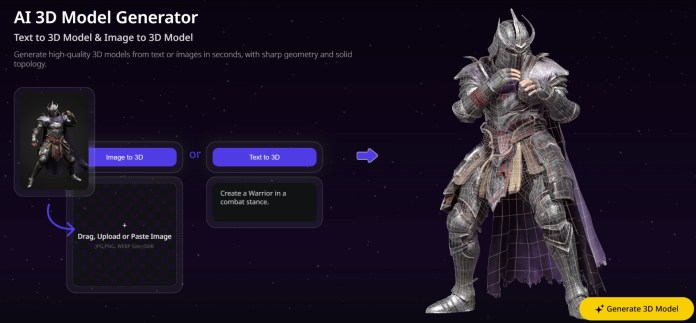
At the heart of Tripo Studio is its multimodal generation engine. You can create 3D models from text prompts, single images, or even multiple reference angles, and the system produces structured geometry rather than just visual approximations. That distinction becomes clear the moment you try to export or manipulate an asset.
A lot of AI 3D tools still output models that look great in a preview window but require significant work before they’re usable in a game engine or 3D environment. Tripo’s newer model architecture is designed to generate geometry directly in three-dimensional space instead of reconstructing it from tokenized sequences. That shift leads to more stable topology, better symmetry handling, and fewer of the quirks that typically show up when geometry is built step by step.
In practical terms, this means assets feel closer to something you can actually use. Generation times can drop to just a few seconds, which changes how you approach iteration. Instead of committing to a single concept and refining it, you can explore multiple directions quickly, adjusting prompts and references until something clicks. It’s less like traditional modeling and more like sketching in three dimensions.
Smart Mesh Generation Changes the Conversation
One of the more compelling additions is Smart Mesh Generation, which focuses on producing meshes that are already compatible with real-time environments. Instead of generating a model and then preparing it for use, Tripo aims to handle both steps at once.
That’s a meaningful shift. Traditionally, even AI-assisted workflows still require retopology, optimization, and a fair amount of manual correction before assets can be dropped into engines like Unity or Unreal. With Smart Mesh Generation, the goal is to reduce that friction and deliver something that’s closer to engine-ready from the start.
It doesn’t eliminate every step in the pipeline, especially for complex or high-end projects, but it reduces the amount of cleanup required. For developers and creators working on tight timelines, that difference adds up quickly. It also makes the platform more approachable for users who don’t have a deep background in 3D modeling but still want to produce usable assets.
Built-In Optimization That Actually Saves Time
Tripo Studio doesn’t stop at generation. It layers in tools that address the usual bottlenecks that come after a model is created, and this is where the platform starts to feel more complete.
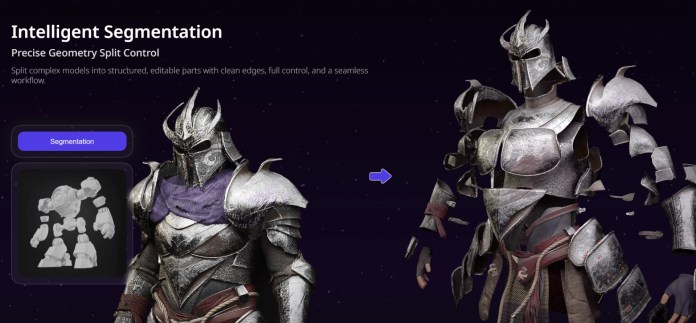
Auto segmentation can break models into editable parts in under a minute, replacing what would normally be hours of manual work. Smart retopology reduces polygon counts significantly while maintaining visual fidelity, making assets more suitable for real-time environments and mobile performance. Auto rigging prepares character models for animation with minimal effort, which is especially useful for prototyping or early-stage development.
On the visual side, AI-driven texture tools allow for quick material application and refinement. Features like localized editing and stylization make it easy to adjust specific parts of a model without reworking the entire asset. Taken together, these tools reduce the need to jump between different applications, which has traditionally been one of the more frustrating parts of 3D workflows.
Two Model Tracks for Different Use Cases
Tripo’s model lineup reflects a practical understanding of how 3D assets are actually used across different industries. Instead of offering a one-size-fits-all solution, it splits its approach into two complementary tracks.
One model focuses on high-fidelity output, producing detailed geometry suitable for applications like industrial design, cinematic assets, or even high-quality 3D printing. The other is optimized for lightweight, engine-ready meshes that can be used in games, XR environments, and real-time applications without additional processing.
This separation makes it easier to choose the right starting point depending on the project. You’re not forced to generate a high-detail asset only to simplify it later, or start with something lightweight and wish you had more detail. It’s a small design decision, but it reflects a broader focus on usability and workflow efficiency.
A Platform That’s Growing Up Fast
Tripo isn’t just building a tool, it’s building an ecosystem that’s starting to gain traction across multiple industries. The platform has scaled to millions of creators and a growing base of developers, with a large volume of generated assets feeding back into its system.
Partnerships and integrations are also playing a role in its growth. Collaborations with display technology companies, game developers, and AI platforms suggest that Tripo is positioning itself as part of a larger pipeline rather than a standalone solution. It’s designed to plug into existing workflows, whether that’s through APIs, plugins, or direct integrations with popular engines and tools.
There’s also a noticeable push toward making the platform accessible at different levels, from individual creators experimenting with ideas to studios looking for ways to accelerate production. That flexibility gives it room to expand without being locked into a single use case.
Where It Fits Today
Tripo Studio works best when you think of it as a bridge between ideation and production rather than a full replacement for traditional tools.
It’s particularly strong for:
- Game development and real-time asset creation
- XR and interactive experiences
- Rapid prototyping for products or concepts
- Early-stage 3D printing models and physical mockups
It can also be useful for content creators who need 3D assets for visuals, marketing, or storytelling without investing heavily in modeling skills.
At the same time, it’s not a perfect fit for everything. Highly precise engineering work, complex mechanical systems, or assets that require exact tolerances will still benefit from traditional CAD or advanced modeling tools. Tripo can get you close, but it’s not designed to replace that level of precision.
The Bigger Shift: AI 3D That’s Actually Usable
The most interesting thing about Tripo Studio isn’t any single feature. It’s the direction it represents and how those features come together into a cohesive workflow.
For years, AI-generated 3D has been impressive in demos but limited in practice. Models looked good on screen but required significant work before they could be used in real applications. Tripo’s approach, particularly with its native spatial generation and smart mesh workflows, is clearly aimed at closing that gap.
The platform feels like it’s moving toward a future where generating a 3D asset is just the first step in a process that’s already optimized for use. Instead of treating AI as a novelty, it’s being positioned as part of the foundation of the workflow.
Early Impressions
After spending some time with Tripo Studio, what stands out most isn’t just how quickly it generates models, it’s how quickly you start thinking differently about the process. There’s less hesitation to try an idea, tweak it, or scrap it entirely and start over, because the cost in time is so low.
It still benefits from a bit of cleanup if you’re aiming for something production-ready, but as a starting point, it’s surprisingly capable. More importantly, it feels practical. Not a demo, not a novelty, but something you could realistically fold into a workflow today and actually save time.
If anything, it shifts expectations. Once you get used to going from prompt to usable asset in seconds, the older, more manual approach starts to feel a little heavier than it used to.
Where Tripo Studio Could Go Next

Looking ahead, the real potential for Tripo Studio isn’t just in speeding up existing workflows, it’s in opening doors for people who wouldn’t normally touch 3D creation at all.
For developers working in AR, VR, and XR, the ability to generate lightweight, engine-ready assets on demand could remove one of the bigger bottlenecks in building immersive environments. Instead of sourcing or building every object from scratch, teams can fill in gaps quickly and iterate in real time.
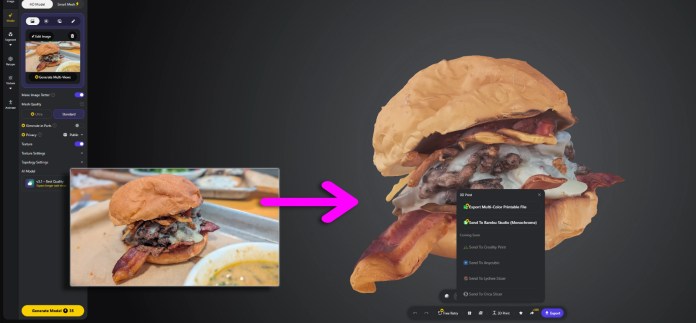
There’s also a clear fit for tabletop creators and D&D game masters. Being able to generate custom miniatures, terrain pieces, or props and send them to a 3D printer adds a new layer of personalization that wasn’t easily accessible before. It turns imagination into something you can actually hold, without needing to learn complex modeling software.
On a different end of the spectrum, side hustlers and small business owners could use Tripo Studio to prototype product ideas, create visual mockups, or even test designs before committing to manufacturing. Whether it’s a custom accessory, a niche gadget, or a branded item, the barrier to entry feels noticeably lower.
That’s where Tripo starts to feel less like a niche tool and more like a platform with broader reach. It’s not just about making 3D creation faster for professionals, it’s about making it accessible enough that more people can experiment, build, and bring ideas to life in ways that weren’t practical before.
Related
Source